Property management software for California brokerages

Rent, trust accounting and every conversation, in one place.

RentDonkey is software for licensed property management brokerages. Collect rent online into your own trust account, send owner statements, e-sign leases and track repairs. Tenants and owners message your team in one inbox, not across texts, calls and email.

  • Your Stripe account, your trust account
  • Card and bank details handled by Stripe
  • One inbox for tenants, owners and your team
Your Brokerage
You owe $2,150.00 on Nov 1
Autopay is on
Rent$2,100.00
Parking$50.00
Total$2,150.00
HomePayRepairs

Built-in messaging

Every conversation, in one inbox.

Keeping track of tenants and owners across texts, calls and email is how things slip. With RentDonkey, your team, your tenants and your owners talk in one place, and every message stays with the home it’s about.

TextsVoicemailsEmail chainsSticky notesOne inbox
  • Tenants and owners write from their portal. Your team answers from one shared inbox. Everyone gets an email when there’s a reply, with a link straight back to the conversation.
  • Repairs keep everyone on the same page. The tenant’s photos, access notes, the vendor visit and the owner’s approval live on one request. Owners see the work, the estimate and the photos, never your messages with the tenant.
  • Notices to every tenant, or one building. Announce a water shut-off or a pest visit by email and in each tenant’s portal. Replies come back privately to your team.
  • Notes for your team only. Leave internal notes on any conversation, out of view of tenants and owners, so whoever picks it up next knows the whole story.
Example · Unit 4B · Repair Kitchen sink leaking
Scheduled
Tenant side
Maria · Tenant
Water is dripping under the cabinet. I put a bucket under it.under-sink.jpg
Your team
Thanks, Maria. A plumber can come Thursday, 9 to 11am. Is it OK to let them in if you’re out?
Maria · Tenant
Yes, that works. The key is with the front desk.
Owner side
Your team
The plumber’s estimate is $240. OK to go ahead?
Mr. Okafor · Owner
Approved. Thanks for the photo.
Team note
Plumber confirmed for Thursday. Only your team sees this.

Features

What you get

One subscription covers every property, owner, tenant and staff login. Open any card to see how it works.

Online rent, straight to your trust account

Tenants pay by bank transfer (ACH) or card, once or on autopay. Money settles in your own Stripe account and pays out to your trust account. RentDonkey never holds it.

How it worksLess
  • Autopay on the due date, or a one-off payment any time
  • Bank transfers are free for tenants; a card convenience fee is shown before they pay
  • A receipt with a confirmation code emailed after every payment

Trust accounting that ties out

A ledger for every owner. Separate security-deposit records and owner reserves. A monthly reconciliation against your bank statement.

How it worksLess
  • Owner funds, deposits and your earned fees kept as separate records
  • Management fees booked automatically as rent comes in
  • A cash reserve per owner held back before each payout

Owner portal and statements

Monthly statements, documents, messages and repair approvals in one place. Your brokerage’s name and logo on every email and sign-in page, and your contact details in every portal.

How it worksLess
  • Monthly statements as PDFs, emailed and kept in the portal
  • Approve or decline repair estimates with one click
  • What came in this month, what went out, and what’s held

Leases, e-signed in order

Your own lease PDF goes out for e-signature: tenants first, then your broker countersigns. Or upload a lease already signed on paper.

How it worksLess
  • A lease details page with rent, due date, fees and deposit added to your PDF
  • Every tenant signs, then your broker countersigns
  • The signed copy is saved to the tenant’s documents

Repairs, tracked to done

Tenants report repairs with photos and get clear emergency steps. Staff, owners and tenants each follow the request from their own side.

How it worksLess
  • Tenants flag emergencies and see what to do right away
  • Vendor, estimate, visit date and completion in one place
  • Owners are asked to approve only above the limit they agreed

Built for California

Late fees, returned-payment fees and deposits kept within California limits, the 21-day deposit itemization, your DRE license on statements, and an audit log of every change.

How it worksLess
  • Returned-payment fees capped at $25 the first time and $35 after
  • Deposit limits checked, including the small-landlord exception
  • A reminder before each 21-day deposit itemization is due

Take over homes already rented

Bring in current tenants mid-lease with what they owe, the deposits being held and the owner’s cash on hand, so your first reconciliation ties out.

How it worksLess
  • What a tenant owed goes on their ledger, not into trust
  • Deposits recorded wherever they’re held, with you or the owner
  • Owner cash you already hold starts in trust on day one

Terms per owner, or per property

Set each owner’s management fee and emergency repair limit, and a different one for any property that needs it. Expense reimbursements pass to the owner in full, with no management fee.

How it worksLess
  • Fee %, reserve and emergency limit on each owner’s agreement
  • A different fee or limit for any one property
  • You choose who pays payment processing fees

Find any entry in seconds

Search and sort the trust journal and audit log by name, amount, owner, property or date. Filter the rent roll by owner and download it as a spreadsheet.

How it worksLess
  • Journal search with in, out and net totals for what you filtered
  • Every change in the audit log: who, what and when
  • CSV downloads of the journal, tenant ledgers and rent roll

A look inside

See it before you sign up

The same app your team, your tenants and your owners will use. Screens show sample data.

app.rentdonkey.com/manager
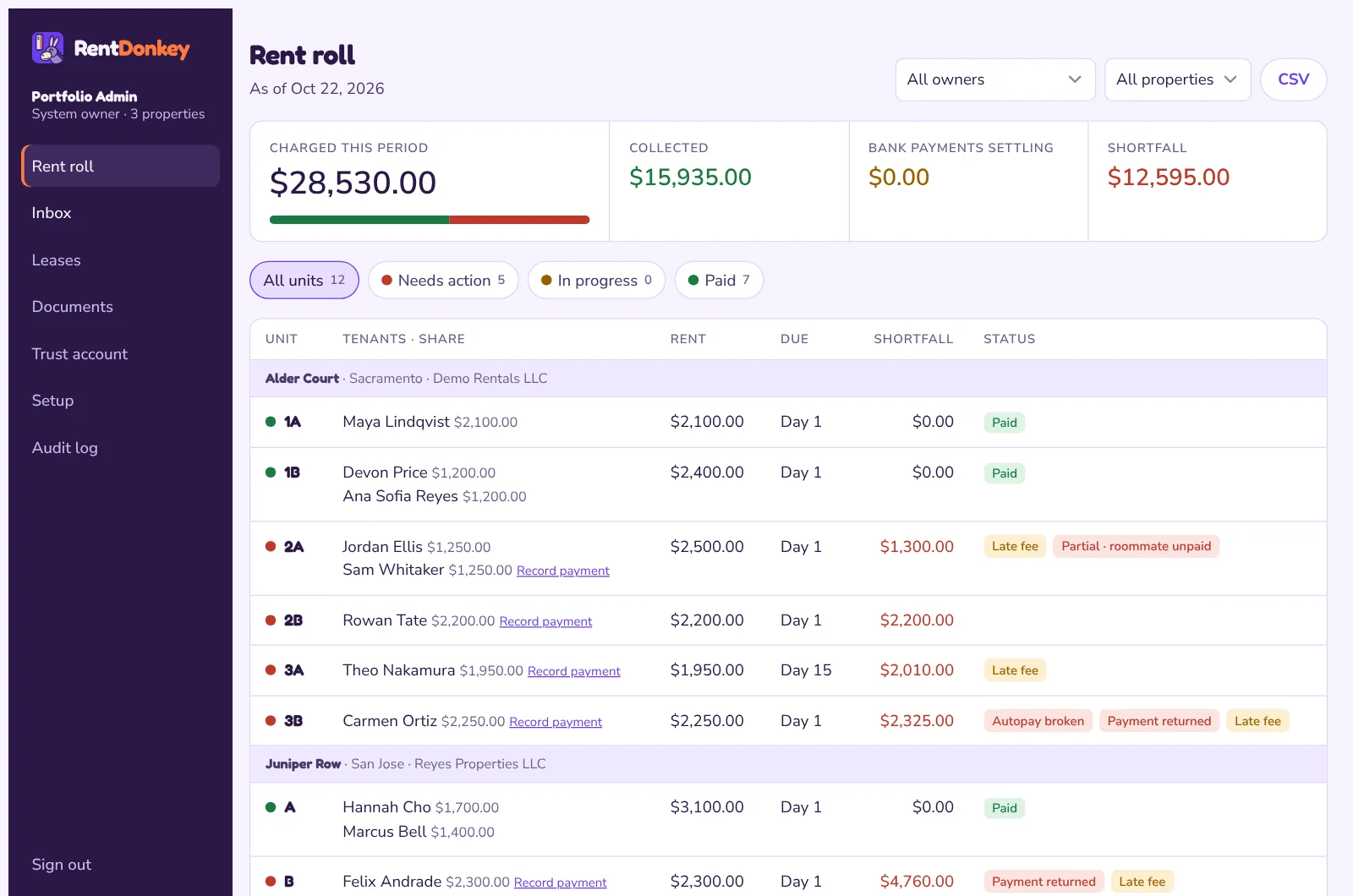
The rent roll in RentDonkey: each unit with its tenants, rent, due day and what is still owed. Sample data.
Your team: the rent roll
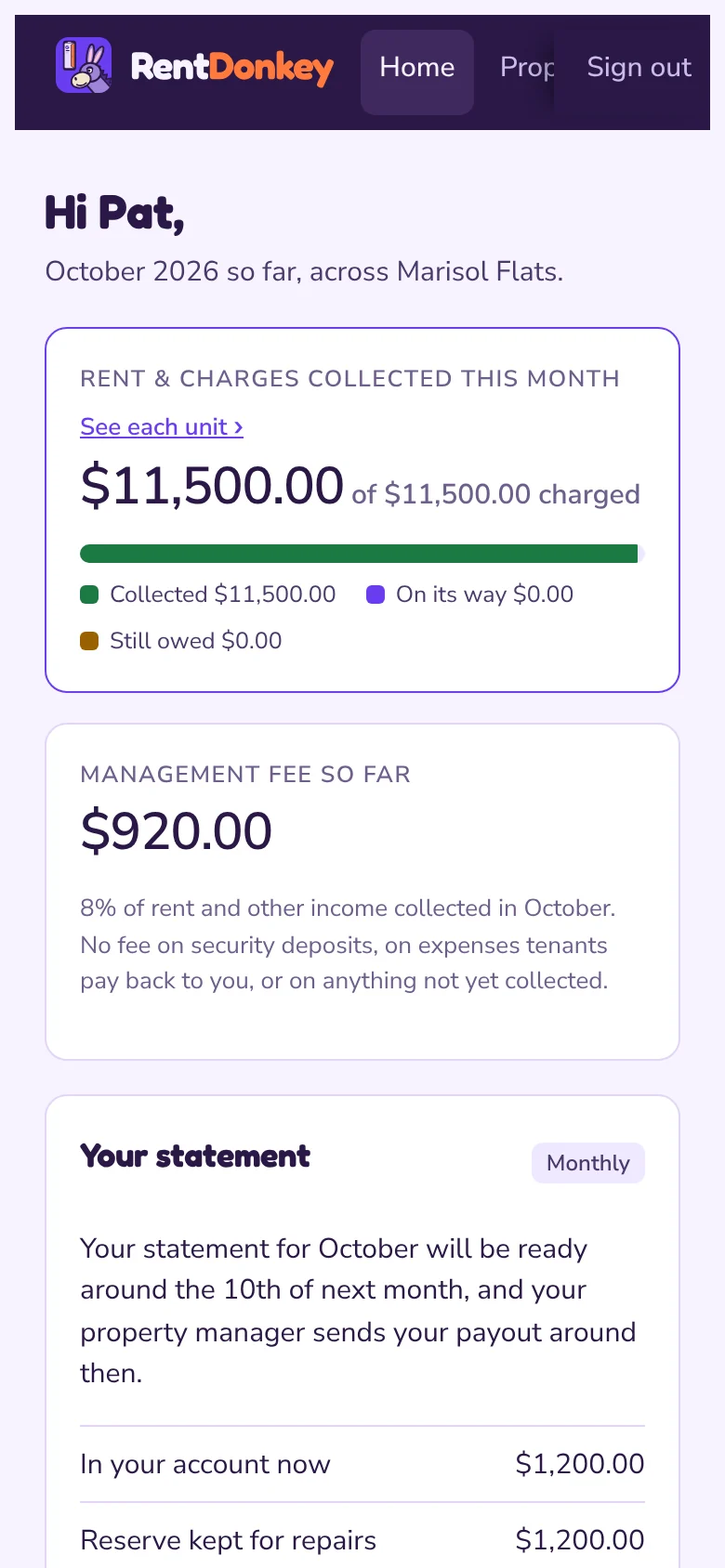
An owner’s home screen in RentDonkey: money in and out this month and what needs their attention. Sample data.
Owners: this month at a glance
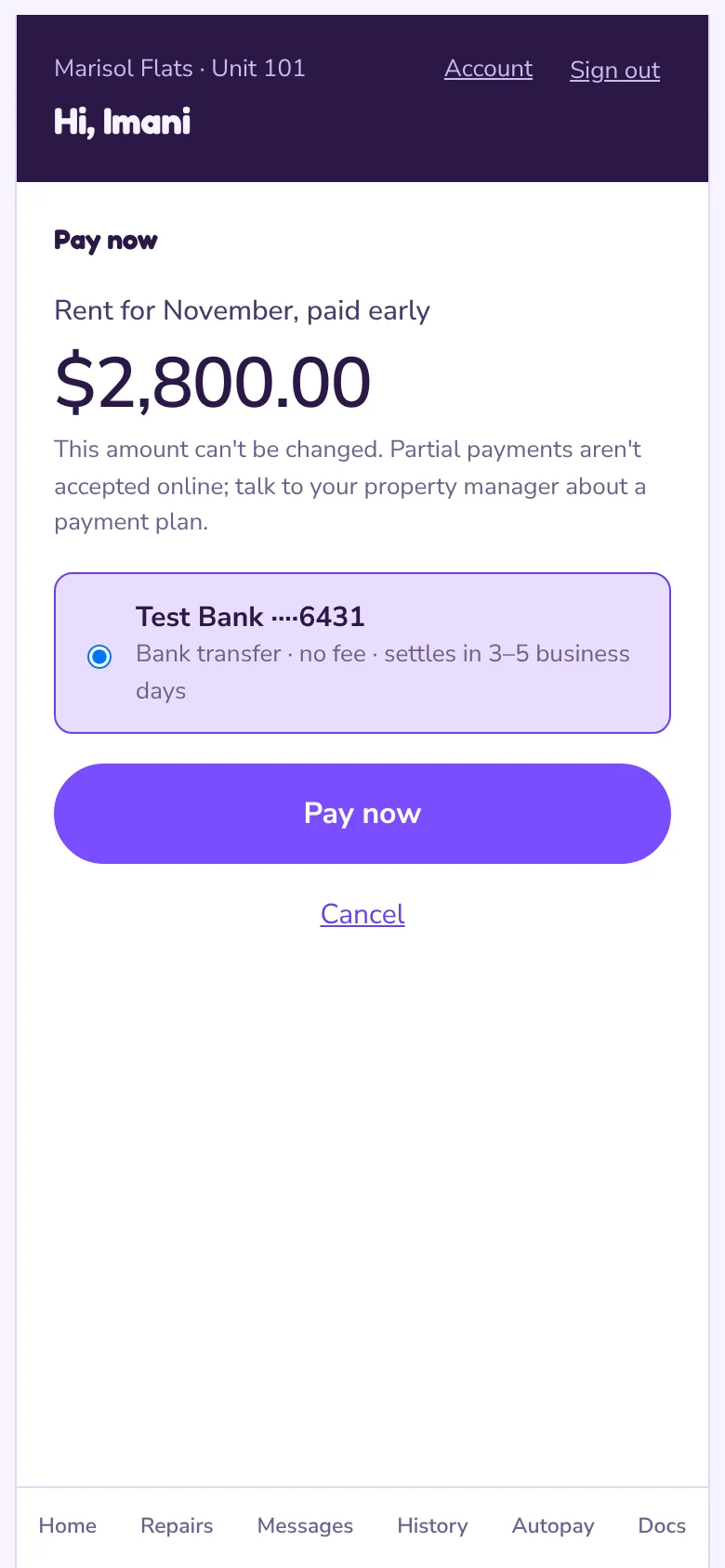
A tenant paying rent in RentDonkey on a phone. Sample data.
Tenants: pay in a few taps

Payments

How rent payments work

RentDonkey is the software. Your brokerage collects the rent.

  1. You connect your own Stripe account

    Stripe verifies your brokerage and pays out to your trust account.

  2. Tenants pay through their portal

    By bank transfer or card. Any card fee is shown before they pay.

  3. The money goes to you

    Each payment is charged on your account and recorded in your trust ledger automatically.

Example · Unit 4B · October rent $2,150.00 Paid by bank transfer on autopay
Paid
Tenant portal Your Stripe account Your trust account
  • Recorded in the trust ledger
  • Confirmation emailed to the tenant
  • On the owner’s monthly statement

Payment security

  • We never see card or bank numbers. Stripe, a PCI-certified payment processor, collects them on its own secure pages.
  • Rent never passes through RentDonkey. It is charged directly on the brokerage’s Stripe account.
  • Every page is served over HTTPS. Sign-in uses one-time email links instead of passwords, and every change is recorded in an audit log.

Pricing

One monthly price, sized to you.

A monthly subscription for your brokerage, in US dollars, priced for the size of your portfolio. Email us for a quote and a walkthrough with your own properties.

Get a quote

Billing, cancellation and refunds

The short version. The full wording is in our terms of service.

Billing

Brokerages are billed monthly in advance, in US dollars. Your price is agreed in writing before you start.

Cancellation

Cancel any time by emailing [email protected]. Service continues to the end of the month you’ve paid for, and you can download your ledgers, journal and rent roll as spreadsheets (CSV) first.

Refunds

Subscription fees aren’t refunded for part months. If we bill you in error, we refund the difference in full.

Rent and deposits

Tenants: rent, deposits and fees are paid to your property manager, not to RentDonkey. For a refund or a question about a charge, contact your property manager.

FAQ

Questions brokers ask

Something else? Send us a note.

Does RentDonkey ever hold our clients’ money?

No. Rent, deposits and fees are charged on your brokerage’s own Stripe account and pay out to your trust account. RentDonkey is the software and never touches the funds.

Can we switch from spreadsheets or another system mid-lease?

Yes. When you take over a home, you enter what the tenant owes, the deposit being held and any owner cash you already have, so your first reconciliation ties out. We walk you through setup with your own properties.

What do tenants pay to use it?

Nothing to sign up. Paying by bank transfer is free for tenants. If they pay by card, a convenience fee is shown before they confirm.

Can owners read our messages with tenants?

No. Each conversation has a tenant side and an owner side. On a repair, owners see the work, the estimate and the tenant’s photos once you ask them to approve it, but never what you and the tenant wrote to each other. Notes marked for your team stay with your team.

Is it only for California?

RentDonkey is built for California brokerages: its deposit, late-fee and returned-payment rules, the 21-day deposit itemization and DRE license details follow California law.

What happens to our records if we cancel?

Service runs to the end of the month you’ve paid for. Before then you can download your tenant ledgers, trust journal and rent roll as spreadsheets (CSV).

Contact

Let’s talk

Ask for a demo with your own properties, a price quote, or help with your account. We answer every message, usually within one business day.

We use these details only to reply to you. See our privacy policy.

The RentDonkey app icon

For tenants and owners

Get the RentDonkey app

Pay rent, report a repair or check a statement right from your home screen. Open app.rentdonkey.com on your phone. On an iPhone, tap Share, then Add to Home Screen; on Android, open the browser menu and tap Add to Home screen. No app store needed.

Open the app